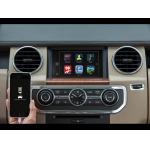
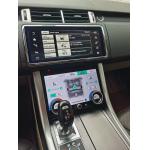
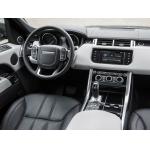
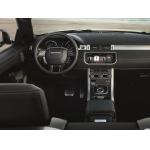
LEADSIGN Wireless Apple CarPlay - Android Auto Interface For Range Rover / Range Rover Sport with the 8" HARMAN Infotainment system
Control with a word.
Or a touch. Or a twist.
CarPlay features Siri voice control and is specially designed for
driving scenarios. CarPlay also works with your car’s controls —
knobs, buttons, touchpad, or touchscreen. And the apps themselves
have been reimagined for the car, so you can use them while your
eyes and hands stay where they belong.
LEADSIGN Wireless CarPlay Interface Features:
1. Wireless Capability---Connect wirelessly
LEADSIGN CarPlay interface for the Land Rover8″ HARMAN system lets you connect your iPhone wirelessly. After pairing your
iPhone and CarPlay Interface once, the interface will
recognize your iPhone each time you get in your car and connect
wirelessly, without you even having to remove your phone from your
pocket or bag. When using CarPlay you’ll be able to answer calls
just like with a Bluetooth hands-free connection. All controls can be done on your car's screen with a touch of OEM
buttons leaving your phone in your pocket.
2. USB multimedia and charging port
Our CarPlay solution comes with a USB port. It lets you charge your
iPhone on longer drives, or you can use it for playing videos and
music on your Audi Screen from a USB thumb drive.
3. Full-Screen Mode---Big Screen
LEADSIGN CarPlay interface lets you use all your favorite CarPlay-compatible iPhone apps on
the original Landroverradio system in full-screen. The retrofit's 1280x480
resolution for big screens and 800x480 resolution for small
screens look great on all screen sizes.
The Full-Screen mode also includes a Screen Mirroring option, which
lets you cast the screen of your mobile device onto the Landrover monitor, and stream audio through the car speakers. iPhones mirror
wirelessly, while Android phones require a cable connection.
4. Easy control with Knob and steering wheel buttons
To navigate the CarPlay apps, you can use Siri (with a press of the
voice command button), the Knob controller or even the steering
wheel buttons.
5.
Siri ----To activate Siri voice control, just press and hold the voice
control button on the steering wheel.
Touch ---- If your CarPlay-equipped vehicle has a touchscreen, you can
use it to control CarPlay.
Knobs and Controls ---- CarPlay also works with the knobs, dials, or buttons in the
car. If it controls your screen, it controls CarPlay.
6. Integration with Front and Rear View Cameras
The LEADSIGN CarPlay Retrofit makes it easy to add front
and reversing cameras to your order for a much lower price. The
front view camera can easily be activated by holding the Option
button for 2 seconds. To exit camera mode, just press Back. It can
also be set up to appear automatically for up to 10 seconds when
shifting from Reverse to Drive. The system also supports OEM (PDC) Parking Distance Control - parking
radar and Dynamic Guidelines will be shown in the LCD while in
Reverse.
7. Maps
Let your iPhone show you the way.
The power and simplicity of Apple Maps is available in your car.
CarPlay can predict where you're going using addresses from your
email, text messages, contacts, and calendars. And now with a more
detailed map, turn-by-tur spoken directions, and immersive 3D
experiences, it's easier than ever to get where you need to go.
One-tap access to your go-to and must-see destinations also helps
you find more to see and do when you get there一whether you're
searching for points of interest, driving to a favorite restaurant,
or looking for nearby gas stations.
8. Other features:
► LEADSIGN CarPlay Interface supports all Apple devices running iOS
up to version 13 and supports all iPhone apps;
► Play music through the Audi stereo system with the help of the
AUX input. If you don’t have an AUX port, we can code your car to
enable the input;
► Our CarPlay retrofit also uses the factory car microphone for
Siri voice commands; This means that you can access your iTunes
library, learn the latest news or send texts hands-free. For this
feature to work, yours has to have Bluetooth or Voice Control;
► The installation is completely plug & play and 100%
reversible.
► Compatible with the original camera and aftermarket camera.
► Support HDMI input for Optional TV tuner BOX, Original Apple
iPhone HDMI video (Netflix....)
★★★Compatible with Jaguar as follow:
Range Rover Evoque/ Discovery Sport 2015-2019 with 8″ HARMAN
Infotainment system
► Andriod Auto is for Android phone running Android 5.0 (Lollipop)
and up with a data plan. For best performance, we recommend Android
6.0 (Marshmallow) and up. You can check your phone’s software
version by looking at the About Device section under Settings.Wireless Andriod Auto is compatible with the following andriod phone only:Pixel, Nexus, or Samsung phones with Android versions shown below:
| Phone make and Model | Android Version |
| Pixel 3 or Pixel 3 XL | Android 8.0 or higher |
| Pixel 4 or Pixel 4 XL | Android 10.0 or higher |
| Samsung Galaxy S8 or S8+ | Android 9.0 or higher |
| Samsung Galaxy S9 or S9+ | Android 9.0 or higher |
| Samsung Galaxy S10 or S10+ | Android 9.0 or higher |
| Samsung Note 8, Note 9 and Note 10 | Android 9.0 or higher |
| Other Samsung devices (incl. Galaxy S20 and Galaxy Z Flip) | Android 10.0 or higher |
| Pixel, Pixel XL, Pixel 2, Pixel 2 XL, Nexus 5X & Nexus 6P | Android 8.0 or higher, support wireless connections in most countries. |
Remark: Also need your Android Auto app version 4.7 and up.