
BLT Biolight M66 Patient Monitor Connection Board Keypad Wiring
|

|
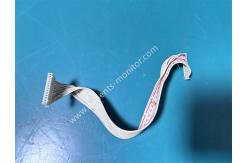
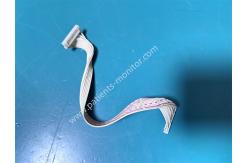
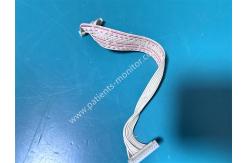
BLT Biolight M66 Patient Monitor Connection Board Keypad Wiring This is an original accessory for the BLT Biolight M66 patient monitor. This cable is one of the internal connection cables for the device. It was removed from a working second-hand unit and is still capable of transmitting signals, making it a suitable replacement for your device during repair. The cable connects the M66 monitor's internal connection board and keypad, transmitting keypad commands to the connection board. This ensures proper transmission of device commands. The cable is 15cm long, fitting comfortably within the device's internal space. The cable surface is made of white PVC, providing insulation for safe use and resistance to bending, ensuring durability. Functions and Advantages 1. Keypad Signal Transmission: The cable transmits keypad commands, such as power on, parameter adjustment, and alarm confirmation, to the connection board, enabling the M66 patient monitor's human-machine interface. 2. Parallel Multi-Signal Transmission: The multi-core design allows for the simultaneous transmission of multiple keypad and control signals, ensuring sensitive and delay-free key response. 3. Anti-interference and stability: The outer layer of the cable is covered with a flame-retardant insulation layer, which effectively suppresses electromagnetic interference inside the equipment, avoids accidental button presses or signal loss, and ensures stable clinical operation. Technical Specifications
Product Images Routine Maintenance and Installation Points (I) Installation Precautions 1. Before replacing cables, completely disconnect the power to the equipment to prevent residual power from damaging the button board or connection board during plugging and unplugging. 2. When installing or replacing cables, ensure the cable ends are aligned with the interfaces on the circuit board. Do not forcefully insert the cable, as this can bend the pins and affect signal transmission. Apply even force when inserting; a "click" sound indicates proper insertion. (II) Routine Maintenance Points 1. Cleaning and Protection: Regularly wipe the cable surface with a dry, soft cloth to remove dust and chemical residue. Do not soak cables directly in liquid. 2. Avoid Pulling: Handle the equipment gently to avoid pulling on the internal cables, which could loosen interfaces or cause cable breakage. 3. Regular Inspection: Check monthly for loose interfaces at both ends of the cable, and for damage or oxidation marks on the cable. Replace any cables with the correct ones immediately if any abnormalities are found. Ordering Information
|
||||||||||||||||||||||||
| Product Tags: BLT Biolight M66 monitor connection board patient monitor keypad wiring Biolight M66 replacement parts |

|
Mindray Patient Monitor Battery LI13I001A Suit For Ipm5 Ipm8 Ipm10 Ipm12 IMEC5 IMEC8 IMEC10 IMEC12 New |

|
051-000943-00 Patient Monitor Spo2 Board Mindray T1 IPM12 IPM10 IPM8 Imec8 Imec10 Imec12 |

|
Patient Monitor Printer Recorder TR60-F Mindray IMEC7 IMEC8 IMEC10 IMEC12 IPM8 IPM9 IPM10 IPM12 MEC T5 T6 T8 Series |

|
PHiliph MX400 MX450 MX Series Patient Monitor AC/DC IV2-FLEX ASSY-PWR AC / DC Power Supply 453564281221 |

|
P/N 453564271711 PHiliph MX400 Mx450 MX Series Patient Monitor Mainboard |

|
MX450 Patient Monitor Battery Board Power Supply Hospital Equipment |