
EDAN F2 Fetal Monitor Mainboard Display Board Connection Cable
|
|
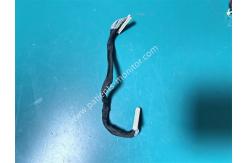
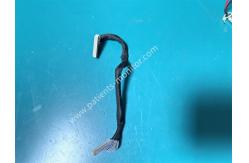
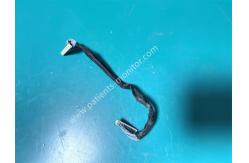
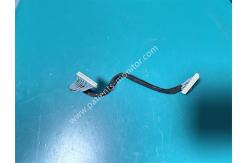
EDAN F2 Fetal Monitor Mainboard Display Board Connection Cable This cable connects the mainboard and display board of the F2 fetal monitor. It has no special part number and is one of the original built-in cables of the F2 monitor. Testing has shown the cable functions correctly, and it can be used as a replacement for a faulty cable. The cable is approximately 20cm long. The white connectors at both ends connect to the mainboard and display board respectively. The black protective layer in the middle is made of non-woven fabric, providing good flexibility and electromagnetic interference resistance. Functional & Advantages 1. Stable Signal Transmission This cable serves as the core data transmitter between the mainboard and display board, responsible for transmitting video and control signals, ensuring that ECG waveforms, fetal monitoring data, and other information are displayed on the screen in real time and clearly. 2. Strong Anti-Interference Capability The black protective layer effectively shields the cable from electromagnetic interference, preventing the fetal monitoring signal from being affected by other modules and ensuring a stable, noise-free display. 3. Precise Compatibility The cable length and connector specifications are perfectly matched to the EDAN F2's mainboard and display board, ensuring high compatibility and reducing the possibility of failure. 4.High reliability The cable adopts a multi-strand copper core design, which is resistant to bending fatigue and can withstand repeated bending when the device screen is opened and closed, and is not easy to break. Technical Specifications
Product Images FAQ Q1: My F2 monitor suddenly displays nothing while running. What could be the cause? A1: This could be due to a loose or faulty cable connecting the mainboard and the display. First, check if the cable is loose. If not, check for breaks or damage and replace the cable if necessary. Q2: My monitor suddenly displays flickering. What could be the cause and how can I fix it? A2: This could be due to poor contact in the connection cable or damage to the cable sheath, causing electromagnetic interference. Check if the connectors are loose and if the sheath is damaged. If damaged, replace the cable immediately. Q3: How do I clean the cables and their connectors? A3: Wipe the cables with a clean, soft cloth and gently brush the contacts with a dry, soft-bristled brush. Avoid using liquid cleaning agents. Check for damage to the sheath; if damaged, replace it immediately. Ordering Information
|
||||||||||||||||||||||
| Product Tags: EDAN F2 fetal monitor mainboard fetal monitor display board cable patient monitor connection cable |

|
Mindray Patient Monitor Battery LI13I001A Suit For Ipm5 Ipm8 Ipm10 Ipm12 IMEC5 IMEC8 IMEC10 IMEC12 New |

|
051-000943-00 Patient Monitor Spo2 Board Mindray T1 IPM12 IPM10 IPM8 Imec8 Imec10 Imec12 |

|
Patient Monitor Printer Recorder TR60-F Mindray IMEC7 IMEC8 IMEC10 IMEC12 IPM8 IPM9 IPM10 IPM12 MEC T5 T6 T8 Series |

|
PHiliph MX400 MX450 MX Series Patient Monitor AC/DC IV2-FLEX ASSY-PWR AC / DC Power Supply 453564281221 |

|
P/N 453564271711 PHiliph MX400 Mx450 MX Series Patient Monitor Mainboard |

|
MX450 Patient Monitor Battery Board Power Supply Hospital Equipment |