
Biocare iM12 Patient Monitor Keypad Membrane Silicone Key Button - OEM Replacement Part
|


|
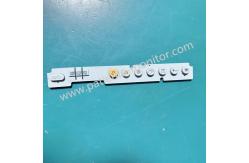
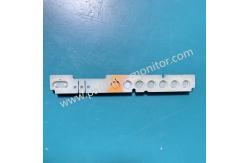
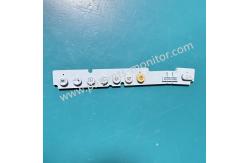
Keypad Membrane for iM12 Monitor Biocare iM12 Patient Monitor Keypad Membrane Silicone Key Button - OEM Replacement Part ► Brief Description The silicone button film on the Biocare iM12 Patient Monitor is a key component of the device's human-machine interface, primarily responsible for transmitting operating commands and blocking external contaminants. As a protective layer for the control panel, it effectively prevents liquid ingress, dust accumulation, and chemical corrosion, ensuring the safety of the internal circuitry. Simultaneously, it provides necessary physical feedback, ensuring the sensitivity and accuracy of button operation. Made from precision-machined silicone, it possesses wear-resistant and disinfectant-resistant properties. Its design precisely conforms to the curvature and perforations of the iM12 panel, ensuring a balance between light transmittance (for backlighting) and tactile feedback. ► Detailed Photos ► Major Parts and Keys 4. Power Switch - Power On: Press this button to start the device after connecting to AC power. - Power Off: Press this button to turn off the monitor. The switch contains an indicator light. The indicator light is on when the monitor is on and off when it is off. 5. A.C. Power Indicator Lamp - On: The monitor is powered on. - Off: Power is off. 6. Battery Power Indicator Lamp - On: Battery powered. - Off: Battery not used. 7. Battery Charging Indicator Lamp - Battery charging: Indicator light flashes; - Charging complete: Indicator light is on; - Battery powered: Indicator light is off. - Battery not connected: Indicator light is off. 8. Alarm Silencing Button: Press this button to silence the alarm. A silence indicator will be displayed in the information area. Other sounds (such as key presses and ORS tones) are unaffected. 9. Alarm Pausing Button: Press this button to pause the alarm. The pause information will be displayed in the information area. Press this button again to resume the alarm. 10. Freezing Button: In fault-free operation mode, press this button to freeze the waveform on the screen. Press this button again to unfreeze the waveform. 11. Screen Switching Button: Press this button to switch the screen layout. 12. Recording Button: If the monitor is equipped with a recording function, press this button to record the real-time waveform. Press it again to stop recording. 13. NIBP Button: Press this button to start or stop non-invasive blood pressure measurement. 14. Main Menu Button: If the main menu is not displayed on the screen, press this button to display it; if the main menu is already displayed, you can press this button to return to the main screen. 15. Shuttle - Rotate: Rotate the lever clockwise or counterclockwise to move the cursor. - Press: Press the button to enter some menus or select some functions. ► FAQ Q1: Are the button films on this monitor prone to damage? A: They generally have a long lifespan, but are mainly affected by environment and operating habits. Long-term use does pose a risk of damage.
Q2: Can I replace it directly? A: We recommend replacement/repair by a professional engineer to avoid damaging the equipment or endangering your safety.
Q3: How do I pay? A: We accept bank transfers, Western Union, and PayPal. |
| Product Tags: Biocare iM12 monitor silicone keypad patient monitor OEM replacement keypad Biocare iM12 membrane key button |

|
Mindray Patient Monitor Battery LI13I001A Suit For Ipm5 Ipm8 Ipm10 Ipm12 IMEC5 IMEC8 IMEC10 IMEC12 New |

|
051-000943-00 Patient Monitor Spo2 Board Mindray T1 IPM12 IPM10 IPM8 Imec8 Imec10 Imec12 |

|
Patient Monitor Printer Recorder TR60-F Mindray IMEC7 IMEC8 IMEC10 IMEC12 IPM8 IPM9 IPM10 IPM12 MEC T5 T6 T8 Series |

|
PHiliph MX400 MX450 MX Series Patient Monitor AC/DC IV2-FLEX ASSY-PWR AC / DC Power Supply 453564281221 |

|
P/N 453564271711 PHiliph MX400 Mx450 MX Series Patient Monitor Mainboard |

|
MX450 Patient Monitor Battery Board Power Supply Hospital Equipment |