
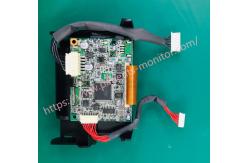
FTP-628MCL506 Welch Allyn Vital Signs Monitor 300 Series 53NTP Thermal Printer
|



|
FTP-628MCL506 Welch Allyn Vital Signs Monitor 300 Series 53NTP Thermal Printer
Start and stop printing • If the monitor is not printing, press to start printing. • When the monitor is printing, press to stop printing. (If the monitor is configured to print continuously, the printer will print a footer before stopping.)
Remarks The push button is not activated during NIBP breaths or unrecoverable device alarms.
batch printing
After a period of continuous patient monitoring, the clinician can use the monitor's batch print function to print all measurements stored in the monitor's memory during the monitoring period. When the monitor is configured for batch printing and is in normal operating mode, press to print all readings stored in memory (up to 99 cycles), starting with the oldest reading cycle and print first. During batch printing, a PRINTING message is displayed and all monitor controls other than and are disabled. Batch printing continues until one of the following occurs:
• All saved data has been printed. • Press again. • Battery error condition. • A major error condition has been detected. In either case, printing will stop immediately.
Remarks If the monitor is configured for continuous printing but printing is disabled, you can press and hold for 3 seconds to immediately start a batch print job. When this batch job finishes, the monitor is still configured for continuous printing.
continuous printing Alternatively, clinicians can print a continuous stream of vital signs and print measurement information immediately after recording the results of each cycle. If the monitor is configured for streaming and is in normal operating mode, press to start streaming immediately. Continuous printing will continue until one of the following occurs:
• press again; the monitor prints an error log (if errors occurred) and a footer, then stops printing. • A major error condition was detected; Printing stopped immediately. • A battery error condition has been detected. Printing will be paused while the battery error persists; Printing will continue if the AC adapter is connected before the monitor is turned off.
printer output Standard printer reports include a header, patient information, patient data (table title, date, time, range, and alarm indicators and readings), error label, and page footer. When the monitor receives a print request but no data is available, it prints only the header and footer.
Thank you so much for your attention.If you're interested in FTP-628MCL506 Welch Allyn Vital Signs Monitor 300 Series 53NTP Thermal Printer ,feel free to contact us .Thank you .. |
||||||||||
| Product Tags: FTP-628MCL506 Vital Signs Monitor Vital Signs Monitor 53NTP |

|
Mindray Patient Monitor Battery LI13I001A Suit For Ipm5 Ipm8 Ipm10 Ipm12 IMEC5 IMEC8 IMEC10 IMEC12 New |

|
051-000943-00 Patient Monitor Spo2 Board Mindray T1 IPM12 IPM10 IPM8 Imec8 Imec10 Imec12 |

|
Patient Monitor Printer Recorder TR60-F Mindray IMEC7 IMEC8 IMEC10 IMEC12 IPM8 IPM9 IPM10 IPM12 MEC T5 T6 T8 Series |

|
PHiliph MX400 MX450 MX Series Patient Monitor AC/DC IV2-FLEX ASSY-PWR AC / DC Power Supply 453564281221 |

|
P/N 453564271711 PHiliph MX400 Mx450 MX Series Patient Monitor Mainboard |

|
MX450 Patient Monitor Battery Board Power Supply Hospital Equipment |