
Edan IM60 Patient Monitor Parts Front Panel Cover Casing Housing Plastic
|


|
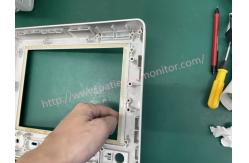
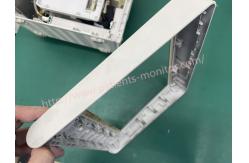
Edan IM60 Patient Monitor Front Panel Cover Casing
Front View
1. Alarm LED - When an alarm occurs, the alarm LED lights up or flashes. The color of the light represents the alert level. Flood Alarm: Flashing Red; Intermediate level alarm: flashing yellow; Low fluid alarm: Physiological alarm is always yellow, technical alarm is always blue.
2. AC LED on: AC power is on; off: AC power is not connected
3. Power Button - Press to turn on the monitor if plugged in or to turn off the monitor if turned on.
4. Battery indicator, see Battery indicator for more information.
5. Mute - press to stop all beeps. When setup is complete, press this button to pause or turn off the audible alarm. See the Silence the Audible Alarm and Silence the Audible Alarm sections for more information.
6. Start/Stop NIBP measurement - Press this button to inflate the cuff and start blood pressure measurement. During the measurement, press the button to stop the measurement.
7. Trend button - Press this button to access the trend table display.
8. Freeze/Unfreeze —— In normal mode, press this button to freeze all waveforms on the screen. In stop mode, press this button to continue updating the waveform
9. Start/Stop recording — Press this button to start live recording. During recording, press this button again to stop recording.
10. Menu - Press this button to return to the main interface when no menu is open. press again to exit
11. Rotary knob (hereinafter referred to as the knob) - the user can rotate the knob clockwise or counterclockwise. This function can move the highlighted item up, down, left and right to select the desired item. Remember that when using a knob, turn that knob to highlight it, then press it to select the item.
Customer service
Excellent customer service is our focus to ensure that your business with us meets or exceeds your expectations every time. All members of our company do their best to respond to any inquiries or concerns from each customer. Let us know what you are looking for and we will let you know when we are able to obtain the medical equipment you need. So, whether you have any questions, comments or compliments, we want to hear from you
If you're interested in Edan IM60 Patient Monitor Front Panel Cover Casing ,feel free to contact us .Thank you . |
||||||||
| Product Tags: Edan IM60 Patient Monitor Parts Front Panel Cover Patient Monitor Parts |

|
Mindray Patient Monitor Battery LI13I001A Suit For Ipm5 Ipm8 Ipm10 Ipm12 IMEC5 IMEC8 IMEC10 IMEC12 New |

|
051-000943-00 Patient Monitor Spo2 Board Mindray T1 IPM12 IPM10 IPM8 Imec8 Imec10 Imec12 |

|
Patient Monitor Printer Recorder TR60-F Mindray IMEC7 IMEC8 IMEC10 IMEC12 IPM8 IPM9 IPM10 IPM12 MEC T5 T6 T8 Series |

|
PHiliph MX400 MX450 MX Series Patient Monitor AC/DC IV2-FLEX ASSY-PWR AC / DC Power Supply 453564281221 |

|
P/N 453564271711 PHiliph MX400 Mx450 MX Series Patient Monitor Mainboard |

|
MX450 Patient Monitor Battery Board Power Supply Hospital Equipment |