
PHiliph Heartstart XL+ Defibrillator Silicon Charge Shock And Sync Button
|

|
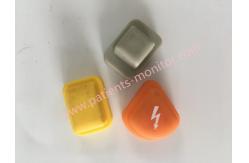
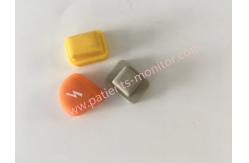
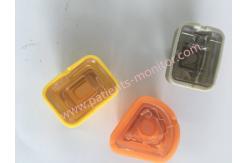
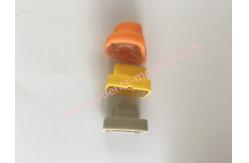
PHiliphh Heartstart XL+ Defibrillator Silicon Charge Shock and Sync Button
▷ About PHiliphh Heartstart XL+ Defibrillator Silicon Button
The PHiliphh Heartstart XL+ defibrillator is equipped with easy-to-use silicone buttons that make it easier for users to operate the device in an emergency. These silicone buttons provide tactile feedback and are durable enough to withstand frequent use. The buttons are also protected by a cover that protects them from damage and keeps them free from dust and dirt. The cover is easily removed for cleaning or replacement when needed, helping to maintain the overall functionality of the defibrillator. Silicone button covers give users the confidence that they can quickly and effectively deliver a life-saving shock to those who need it.
Charge Button – Charges the defibrillator to the selected manual defibrillation energy setting. It is used only in manual defibrillation mode. The defibrillator automatically charges in AED mode.
Shock Button – Delivers a shock via the multifunction pads or the unswitched internal paddles. In manual defibrillation mode, the shock is delivered at the selected energy. In AED mode, the shock is 150J if the patient category is set to adult and 50J if set to infant/child. The button flashes while charging.
Sync Button – Switches between synchronized energy delivery used during cardioversion and asynchronous energy delivery used during defibrillation. The Sync button lights blue when synchronization is active.
Notes :When external paddles or switched internal paddles (internal paddles that have Shock buttons, as opposed to switchless internal paddles where you administer the shock by pressing the Shock button on the device)
▷ Specification of PHiliphh Heartstart XL+ Defibrillator Silicon Button
▷ Sync button Test
The device prompts you to press and release Sync Button .
Press and release the Sync buttonP
Note If the device does not detect a pressed Sync button within 10 seconds, you are prompted to use the Menu Select button to select OK.r
Pass - Sync button passed. Fail - Sync button is not functioning.e
Repeat Operational Check and make sure you press the Sync button. If it continues to fail, take the device out of use and call for service.ss and Release Sync Button Press and Release Sync Button
Thank you for your attention .If you're interested in PHiliphh Heartstart XL+ Defibrillator Silicon Charge Shock And Sync Button ,feel free to contact us .Thank you . |
||||||||||||||||
| Product Tags: PHiliph Heartstart XL+ Defibrillator Charge Button PHiliph Heartstart XL+ Defibrillator Silicon Button PHiliph Heartstart XL+ Defibrillator Button |
|
Innomed Cardio-Aid 200-B Defibrillator Energy Release Board R-4721-6 M50812003 with Good Condition |
|
GE DASH2000 monitor complete set of housings patient monitor complete cover medical part |
|
Original Medtronic LP20 Defibrillator Paddle Pad with 2-360 J Energy Range 8mm Thickness and ≥95% Efficiency |
|
Omron AED Cover With Key Membrane And Speaker W.321414.UK C9457 QC PASSED HQ17-013-007 |
|
Medtronic LP20 Display Screen Protector In Good Working Spare Parts Medical |
|
Innomed Cardio-Aid 200-B Defibrillator Test Board ARTEMA DEFI TEST 39140-B Used in Good |