
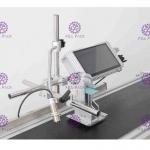
High Speed PET Bottles Inkjet Printer Oil Ink Printer/ Printing Machine / Equipment / Line / Unit for Batch Logo Date Coding
|


High Speed PET Bottles Inkjet Printer Oil Ink Printer/ Printing Machine / Equipment / Line / Unit for Batch Logo Date CodingGeneral: 60Y Inkjet code printer has one-shot special, multiple interval printing function, according to the customer printing requirements, the use of man-machine dialogue, in inkjet printing on the screen arbitrary number. It can print a version of a multi-grain medicine, health products, capsules, and cosmetics. In addition, such models are also equipped with a variety of colored inks specially, with your products complement each other, beautiful appearance.
Inkjet printer operation process description: 1. Check whether the photoelectric sensor or synchronous encoder is inserted in the wrong position, and check whether the nozzle is connected properly. 2. Turn on the power switch after connecting the power supply. 3. Set up the coding content: such as font size, height, direction and so on. 4. Set up the sensor: when using a synchronous encoder, choose a synchronous encoder, and when using a photoelectric sensor, choose a photoelectric sensor. 5. Turn on the ink supply and wait for the ink supply to complete. 6. Check whether there is a tiny ink line in the nozzle, if there is, it means that the ink has been supplied normally. 7. After everything is ready, you can start printing. 8. After printing is complete, press to stop printing. 9. The ink can be stopped within 3 hours of temporary shutdown, and the printing can be stopped directly by clicking, and the waste liquid box is placed under the nozzle. 10. If the machine is shut down for more than 3 hours, it needs to stop printing and stop ink supply. It must be cleaned and cleaned to complete the cleaning of the entire ink path. |

|
High Speed PET Bottles Inkjet Printer Oil Ink Printer/ Printing Machine / Equipment / Line / Unit for Batch Logo Date Coding |

|
Automatic L Type PE Shrink Film Wrapper Water Beverage PET Glass Bottle Can Equipment |

|
PE Film Shrink Wrapping Packaging Machine L Type PET Mineral Water Beer Beverage Can |
|
Automatic 75 m/min speed High resolution inkjet print coding machine for date code / logo |

|
10pcs/Min Shrink Bottle Seal Packing Machine For Beverage Bottle |

|
Hot Glue Bottle Case Packer Machine automatic continuous feeding |